Overview

OpenAPI contracts -> running services without writing code!
Apistry is a runtime engine that uses OpenAPI 3.0 contracts to provide a fully functional REST service. This is accomplished Without writing service-specific code — business logic is added only where explicitly needed via actions. The contract is extended to have all the needed config to drive the service.
It is now possible to have a fully operational service up and running in minutes!
...because routing, validation, and persistence are derived directly from the contract.
This page shows the fastest way to get Apistry running. Detailed explanations live in Getting Started and Guides.


✨ Features
🚀 Contract-Driven Runtime
- OpenAPI 3.0 as the Source of Truth – Define your API once; Apistry generates routes, validation, and persistence automatically
- No Service Code by Default – No controllers, routers, or boilerplate to get a working service
- Swagger UI Included – Interactive documentation for every running endpoint
🧠 Validation & Normalization
- Automatic Request & Response Validation – Powered by AJV and JSON Schema
- Deterministic Canonicalization – Defaults, coercion, and enum normalization applied consistently
- Strict Contract Enforcement – Invalid requests never reach business logic
🗄️ Data & Persistence
- Automatic Collection Creation – Databases and collections are created and validated from OpenAPI tags at startup
- NeDB (Built-in) – In-memory or filesystem-backed JSON document database for fast local development
- MongoDB Support (Licensed) – Production-ready adapter with MongoDB-style semantics
- JSON Document Model – Designed to work with any document-oriented database
🔍 Querying & Bulk Operations
- Rich Query Operators – eq, neq, gt, lt, gte, lte, isNull, isNotNull, and wildcard matching
- Bulk Inserts, Updates, and Deletes – Operate on multiple records efficiently
- List Responses with Metadata – Optional pagination and total-count information
🔧 Extensibility & Orchestration
- Orchestration Actions – Add custom business rules and workflows only where needed
- Built-in Actions – Includes
http.call,contract.normalize.response, and other core actions - Custom Actions (Licensed) – Write and register your own business rules and orchestration logic
- Explicit Lifecycle Stages – Business validation and orchestration are cleanly separated from system mechanics
⚙️ Platform & Deployment
- Fastify-Based – High-performance, low-overhead Node.js runtime
- CLI-First Experience – Start and manage services in seconds
- AWS Lambda Ready – Serverless deployment support (coming soon)
Why This Matters
Apistry removes boilerplate and enforces a clear service lifecycle, so developers focus on business meaning, not infrastructure mechanics.
💻 Quick Start
🧰 1. Install
Install apistry globally
$: npm install -g apistry

added 191 packages in 6s

63 packages are looking for funding
  run `npm fund` for details
📖 2. OpenAPI contract
Apistry, being a contract based service, requires a well-defined contract to startup. The following examples have been provided to get you started quickly:
- Books (
books.v1.yaml) - Cars (
cars.v1.yaml) - Has most sample endpoints and features - Notes (
notes.v1.yaml) - Polymorphic example - Swapi (
swapi.v2.yaml) - Demonstrates use of Actions to call external APIs and do contract normalizations - Utils (
utils.v1.yaml) - Simple utility endpoints for health checks and ??? - Videos (
videos.v1.yaml)
Download contracts.zip and extract all contracts and sample data files
$: cd ~
$: curl -o contracts.zip https://www.apitapestry.net/apistry/assets/contracts.zip
  % Total    % Received % Xferd  Average Speed   Time    Time     Time  Current
                                 Dload  Upload   Total   Spent    Left  Speed
100  995k  100  995k    0     0  3986k      0 --:--:-- --:--:-- --:--:-- 3981k

$: unzip -q contracts.zip
contract.zip directory structure:
/contracts
  ├── books.v1.yaml
  ├── cars.v1.yaml
  ├── notes.yaml
  ├── swapi.v2.yaml
  ├── utils.v1.yaml
  ├── videos.v1.yaml
  ├── data                   ← Example data files for import
  │ ├── books.json
  │ ├── cars.json
  │ ├── notes.json
  │ └── videos.json
  └── nedb                   ← Example database files
    ├── books.db
    ├── cars.db
    ├── notes.db
    └── videos.db
🛢 3. Database
Apistry comes packaged with an in memory, filesystem backed DB that functions similar to MongoDB called NeDB.
The downloaded contracts.zip file contained db files that already have data needed to run the contracts.
For now, we will start the service using the -d flag to point to the nedb directory that contains the NeDB files.
🖥️ 4. Start the Server
Starting the server is fast and easy.
$: apistry serve -c contracts -d contracts/nedb

────────────────────────────────────────
🚀 serve
────────────────────────────────────────
• Contract Path  : /Users/myUser/contracts
• Db Connection  : nedb:///Users/myUser/contracts/nedb
• License        : —
• Log Level      : info
• Log Mode       : cli
• Port           : 3000
• Host           : localhost
• Swagger Enabled: enabled
• Service Name   : APIstry
• Service Desc   : OpenAPI contracts -> running services without writing code!
• Raw            : { dbDir: "contracts/nedb", logLevel: "info", contract: "contracts" }
────────────────────────────────────────

[15:37:12] INFO: errors_plugin_registered
[15:37:12] INFO: server_starting
[15:37:12] INFO: db_connected
[15:37:13] INFO: ✅  Loaded 37 routes!
[15:37:13] INFO: Server listening at http://[::1]:3000
[15:37:13] INFO: Server listening at http://127.0.0.1:3000
[15:37:13] INFO: server_started
Local server is now running!
📡 5. Make API Calls
You can now make requests to your api using any REST client - including your browser. Here are some
example endpoints:
- Get all blue cars: GET: http://localhost:3000/v1/cars?color=Blue
- Get all features of a car: GET: http://localhost:3000/v1/cars/{carid}/features
- Get all events of a car: GET: http://localhost:3000/v1/cars/{carid}/events
Curl example:
# Get all cars
curl -X GET "http://localhost:3000/v1/cars" -H "accept: application/json"
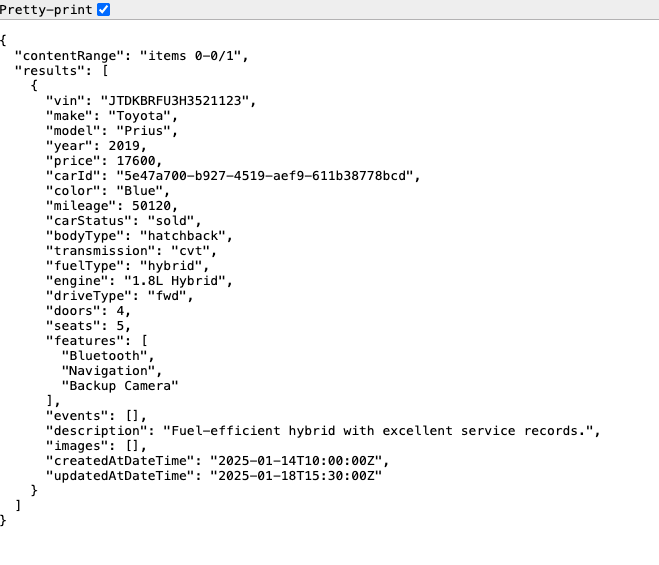
Call using a browser:
url: http://localhost:3000/v1/cars?color=Blue
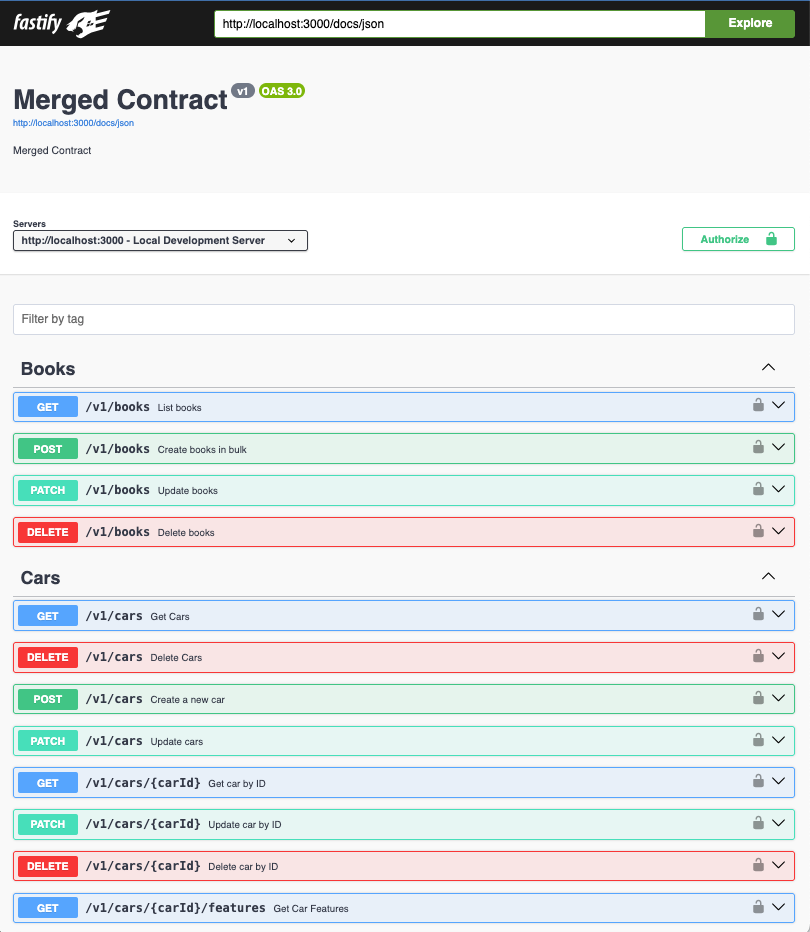
Hitting the docs endpoint in browser:
What just happened?
- Apistry read your OpenAPI contracts
- Generated routes, validation, and persistence automatically
- Exposed Swagger UI for exploration
- No service code was written
🛠️ 6. When do I write code?
Custom code is only required when you need business rules or orchestration. Everything else is driven by the contract. See "Creating Orchestration Actions" in the documentation for more details.
🚦 What’s Next?
Now that you have a running service, you may want to explore:
- Service Lifecycle – How Apistry enforces validation, normalization, orchestration, and persistence
- Writing Orchestration Actions – Adding business rules and workflows (licensed feature)
- Contract Design Guidelines – Designing APIs that work well with Apistry’s runtime
- CLI Reference – Full command-line options and flags
All documentation is available in the left navigation.
ℹ️ Support
If you need help using Apistry or have any questions, you can use GitHub Discussions
If you have a bug or feature request, create an issue for it.
📜 License
Apistry includes an open-source core licensed under the Apache License 2.0.
The following capabilities require a paid commercial license:
- Production database adapters (including MongoDB)
- Authoring and registering custom orchestration actions
The built-in NeDB adapter and provided actions are available for local development and evaluation.
See the documentation for details on licensing and feature availability.